
It is important to create a compelling user interface for the automotive instrument cluster. When TFT instrument clusters are used, embedded graphics libraries are needed to realize the visual interface. Typically, TFT instrument clusters employ a TFT LCD based technology display ranging between 3.5" to 12.3". The display could be either square or wide-angle rectangular. Many tft based instrument cluster designs incorporate a capacitive touch interface while others are navigable with buttons and steering wheel controls. Choosing the right embedded graphics libraries is therefore one of the most critical decisions in any tft based instrument cluster program.
To enable the realization of the visual interface in graphical TFT instrument clusters, there is a need for embedded graphics libraries that help render widgets and other representations on the screen. Embedded graphics libraries typically provide widgets or visual elements such as text boxes, dial gauges, and manage the rendering of these elements in a z-order manner. They also handle dirty region identification and rendering, event handling, double/triple buffer management, GPU acceleration, and more. Without robust embedded graphics libraries, it would be too cumbersome to meet the quantum of user experience requirements in modern tft instrument clusters.
The underlying MCU/SoC determines the level of rendering and display features that can be achieved. High-level SoCs house dedicated GPU units like Mali or PowerVR that perform very advanced graphics. Mid-level MCUs/MPUs have 2.5D/2D rendering engines that can handle substantial rendering without CPU involvement. Finally, low-end MCUs need full software rendering over CPU. While it is rare for embedded graphics libraries to support all such device classes, cross-platform support is a valuable differentiator that can optimize the toolset skill required to support clusters across different vehicle segments.
Apart from the embedded graphics libraries themselves, an integrated development environment (IDE) is needed to design screens and bring the whole interface to life. Most IDEs provide a drag-and-drop approach to UI design. The amount of coding work needed on top of this varies from vendor to vendor — which determines ease of use. Another important aspect is cross-platform support, since the entire tft based instrument cluster may be moved to a different architecture for business or technical reasons. In such cases, an IDE tied to a specific platform forces the entire application logic to be re-developed.
Using well-chosen embedded graphics libraries and IDEs will significantly reduce development time across the number of vehicle variants to be supported from the same cluster firmware. With this context, let us explore some of the key embedded graphics libraries and development ecosystems available for tft instrument clusters along with their pros and cons.
Most silicon vendors provide embedded graphics libraries developed in-house to support their device offerings. While quick demonstrations are available, support is typically limited since graphics is not the vendor's primary product line and the libraries are not always updated to handle modern features.
Qt is arguably one of the most popular embedded graphics libraries for TFT instrument clusters. Supporting a wide range of SoCs and MCUs, Qt is a cross-platform library that leverages Signals and Slots for communication with business logic. It uses QML (Qt Modelling Language), a markup language for designing user interfaces, and offers Qt Design Studio as a powerful development IDE. While higher-end Qt uses OpenGL or native rendering APIs, the lower variant for microcontrollers — "Qt for MCUs" — can run even on bare metal for tft based instrument cluster targets.
Qt is one of the most popular embedded graphics libraries, widely used beyond automotive and powering frameworks like KDE with over a million developers. The learning curve is steep as it is primarily C++, while most of the automotive world still uses C. The extent of support for "Qt for MCUs" is also limited in that many desktop features do not work there. Qt is typically available under a royalty-based licensing model.
Another set of embedded graphics libraries available for all processor ranges is Altia. Altia Design supports importing 2D and 3D assets and enables rapid user story development with blended animations, responsive layouts, and simultaneous rendering by both real-time cores (Cortex-M) and application cores (Cortex-A). The code is generated in C for ease of certification. Altia claims a large user base with many leading OEMs opting for its advanced graphics library for tft instrument clusters.
EB GUIDE Studio is another tool widely used in automotive embedded graphics libraries. The model-based tool offers vector-based and 3D graphics with effects and animations. The Graphics Target Framework (GTF) is the run-time environment for the target platform. It includes speech technology, multi-touch, and customizable gesture support. EB natively supports key and knob usage for touchless interface, supports all major OS and RTOS environments, and can leverage OpenGL/GLES acceleration for tft instrument clusters.
Packaged together as Kanzi One, Kanzi Engine is the real-time graphics engine while Kanzi Studio is the HMI development tool. Kanzi also offers feature packs such as Connect for device connectivity, Maps for stylish map rendering, and Particles for animations and effects. The framework appears targeted at higher-end platforms with OpenGL-based acceleration, though the present state of Kanzi-Lite — the variant targeted for lower-end MCUs in a tft based instrument cluster context — is less well documented.
With computing becoming cheaper, Android-based embedded graphics libraries now appear even on electric bikes. Android has one of the most popular UI frameworks and applications can be written in Java. Android comes with rich effects, animations, and a powerful IDE — Android Studio. Though boot times and an architecture optimized for mobile phones present challenges for tft instrument clusters, Android remains a preferred option for graphics-heavy development scenarios.
Sparklet embedded graphics library is a cross-platform library supporting 2D, 2.5D, and 3D rendering that runs on a variety of MCUs and MPUs. Originally designed for industrial HMI use cases, Sparklet finds wide application in tft instrument clusters and the broader automotive industry. Flint is the associated development IDE, offering a WYSIWYG editor with UML-based design support. Flint directly imports different asset types and provides a low-code development methodology for tft based instrument cluster programs where the entire user story can be realized with the convenience of a drag-and-drop mouse interface. Our product engineering services include Sparklet-based cluster development for both two-wheeler and four-wheeler OEMs.
The sparklet embedded gui library includes a comprehensive standard widgets library covering gauges, bar graphs, dial pointers, animated transitions, number counters, custom vector paths, and tell-tale indicators. This standard widgets library dramatically accelerates tft based instrument cluster development by providing pre-validated, automotive-tested UI components that can be dropped directly into the Flint IDE canvas. Another unique advantage of the sparklet embedded gui library is that it generates platform-independent binary code that runs on any target equipped with the Sparklet runtime engine. Offered as a one-time licensing model without royalties, it provides outstanding value for tft instrument clusters across multiple vehicle programs. Learn more about the Sparklet embedded GUI library and how it accelerates your cluster program.
Apart from the frameworks above, other embedded graphics libraries such as Embedded Wizard and Candera CGI Studio are also available. The choice of embedded graphics libraries for tft instrument clusters depends on specific project requirements, the target hardware platform, and the budget. When choosing embedded graphics libraries, it is important to understand their fit for the overall product roadmap, the level of vendor support available, and cross-platform portability. Customer requirements often exceed the given features of any tool, making strong vendor support a key differentiator in any tft based instrument cluster program.

Embien offers end-to-end automotive instrument cluster development — from selecting embedded graphics libraries and tft instrument clusters platforms to complete HMI software delivery and production support.

Embien's UI/UX design services for automotive applications cover HMI design, widget design, theme development, and user story creation for tft based instrument cluster and other embedded display programs.
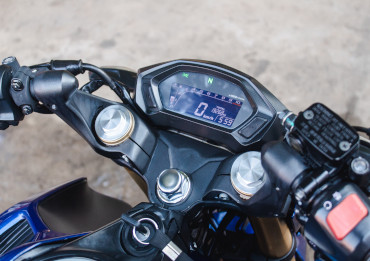
A case study on developing a TFT based instrument cluster using Sparklet embedded graphics libraries on the Renesas RH850 MCU — covering hardware bring-up, HMI design, CAN integration, and functional validation.