
In the last blog, we covered introduction to bootloader, its different stages and its features. In the current IoT world, electronic products in all domains require a device firmware update to add new features and improve performance for consumers. This way product owner or OEM can retain the customers with them. This is like a double-sided sword — a failure in the device firmware update process can make the customer unhappy and OEM can lose market share. For this, a robust DFU (device firmware update) architecture is required. In today's blog, we will cover device firmware update design principles and DFU architecture approaches developers need to be aware of for building a robust system. Digital transformation services increasingly rely on secure device firmware update mechanisms to maintain product longevity across IoT fleets.
Need for robust Device Firmware Update
An embedded product contains multiple components such as application, bootloader, product configuration etc. So, during device firmware update the OEM should be able to update each component individually on a need basis. This can be achieved by updating those sections in flash memory using a low-level flash driver. Post upgrade/update, keeping the user experience intact is very critical.
For example,
- Android phones after security or OS upgrade should still be connecting with preconfigured wireless configurations. Otherwise, customers need to re-pair their BLE devices which will make them unhappy.
- In case of upgrade failure, the phone should still boot with previously known good configurations — the rollback capability is essential. If a device gets stuck requiring a service center visit, the customer will stop using the product.
In the field, it is advisable to do device firmware update only for components with critical bug fixes, security patches, and performance enhancements. Firmware update over the air OTA has become the preferred deployment mechanism for connected IoT products.
Software Upgrade process
Let's take an example of an electronic product used by everyone — a Smartphone — to understand the basics of the device firmware update process. A smartphone is a powerful embedded product containing components such as bootloaders, kernel (OS), root filesystem, application, and user data. Device firmware update for this system can be achieved by generating and rolling out a single image containing all components or by rolling out individual component images for update.
This update image could be downloaded over the internet or local connectivity and made available completely before the start of the upgrade process (e.g., Smartphone update). Or the bootloader can download the update image part by part dynamically during the device firmware update process (e.g., ECU update over UDS). SaaS Development Services help OEMs design robust firmware update rollout pipelines aligned with scalability requirements.

Software Upgrade Process
In either case, due to power fluctuation or a corrupted file an upgrade process can be disturbed and fail. In those situations, consumer experience should not be impacted. A robust failure recovery mechanism needs to be implemented as part of the DFU architecture. In the DFU architecture, an architect/developer can provision non-volatile storage space for 2 copies of the kernel and application — this is called AP partitioning or A/B slot design. AP partitioning keeps one as the active partition and another as the upgrade/golden partition for rollback during failure.
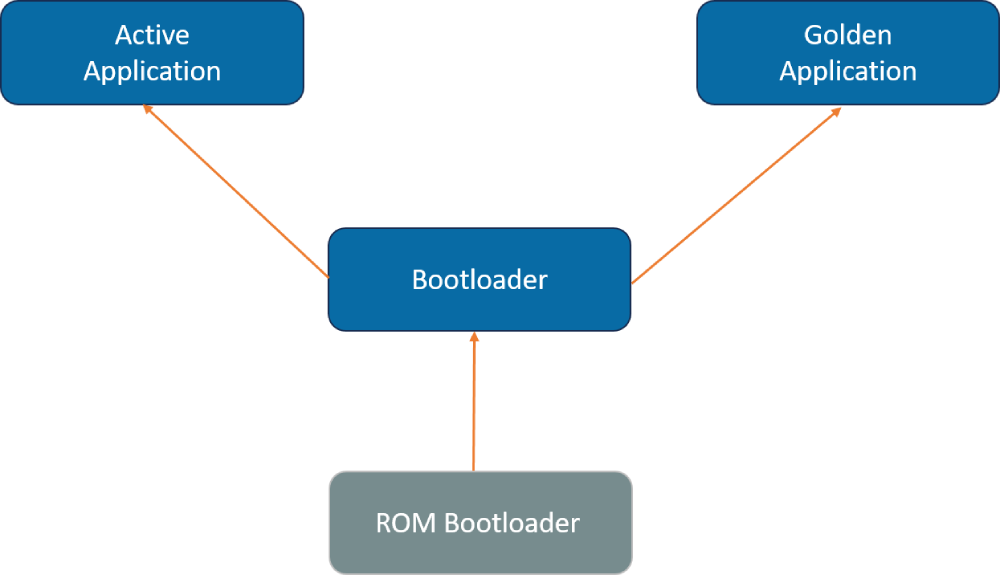
Software Upgrade Process during failure
Or the bootloader can detect update failure and reinitiate the process once again by itself.
DFU Architecture
An architect can adapt the right device firmware update approach based on the customer impact and available resources in the product such as RAM, Flash, Boot medium etc. The DFU architecture must support AP partitioning where resources allow, to enable seamless rollback and recovery. There are a few approaches possible:
- DFU – Updating only application
- DFU – Updating the bootloader
- DFU – Updating the bootloader with recovery
The below sections describe each DFU architecture in detail.
DFU - Updating only Application
In this DFU architecture, the DFU software is kept separate from the main application as a part of bootloader software. The application alone can be updated by keeping the bootloader fixed without change. The challenge in this DFU architecture is that the DFU code must be robust. In case of any bug or defect in DFU software after product release, OEM is left with only 3 options:
- Recall the product to factory and update using professional tools.
- Swap existing products with new products with fixes and new features.
- If the number of devices in the market is small, field engineers can go in person and update the software with wires.

DFU - Updating Only Application
Or the bootloader can detect update failure and reinitiate the process once again by itself.
This type of device firmware update is preferable only if the number of products in the market is very small and the possibility of upgrade necessity is very low. This simple DFU architecture does not support AP partitioning, so automatic rollback to the previous version is not available.
DFU - Updating Bootloader
The number of embedded products in the market is growing every day with more and more features. DFU architecture with only application upgrade is not suitable for all product lines. Smartwatch or Android phone device firmware update scenarios cannot be deployed with the above limitations. As per Jack Ganssle, on average for every 1000 lines of code there are about 50+ bugs. DFU in bootloader is also expected to have bugs. So, the DFU architecture must have provision to update the DFU itself on a need basis.

DFU - Updating Bootloader
To support that, an additional component (DFU updater) is added in the bootloader. This DFU updater validates the Bootloader software integrity and flashes the same. Post flashing the bootloader software, DFU updater will reboot the device to boot from the new Bootloader. The limitation in this DFU architecture is that the bootloader software device firmware update should never fail due to factors such as power failure or corrupted Bootloader software.
DFU – Updating Bootloader with recovery
The above bootloader upgrade failure limitation can be addressed with a slight change in the DFU architecture. A first stage Bootloader component is added to validate the checksum of the second level bootloader and jump to it. In case of checksum failure, the first stage bootloader jumps to the DFU updater to do the second stage bootloader update. AP partitioning can be implemented for application partitions within this DFU architecture, enabling true rollback capability if the newly deployed firmware fails verification.

DFU - Updating Bootloader with recovery
In this approach:
- First stage Bootloader can be very light, doing only one job of validating the checksum and jumping.
- DFU updater shall be capable of updating Bootloader memory.
- Second stage bootloader software can have the intelligence to update all other application components.
Conclusion
For an electronic product, device firmware update must be robust and the DFU architecture must be chosen as per device use cases and customer impact. Implementing AP partitioning ensures automatic rollback in case of a failed device firmware update, preserving the user experience. By choosing the right DFU architecture, OEMs deliver a better customer experience and retain market share. At Embien we have designed device firmware update solutions from microcontroller to processor and single core to multi core systems for automotive, medical and industrial domains. We have also enabled bootloaders with secure upgrade and root of trust.